
PAMM & MAM Solution for MT4 and MT5 brokers Your best traders manage money. You take a share of every fee.
PAMM and MAM software that plugs into your MT4 or MT5 setup. No CRM switch. No migration.
Two ways to run it
Add managed accounts without replacing your tech stack
Run it standalone on the systems you already use, or switch it on inside Leverate CRM.
How it works
Two models. Four steps each.
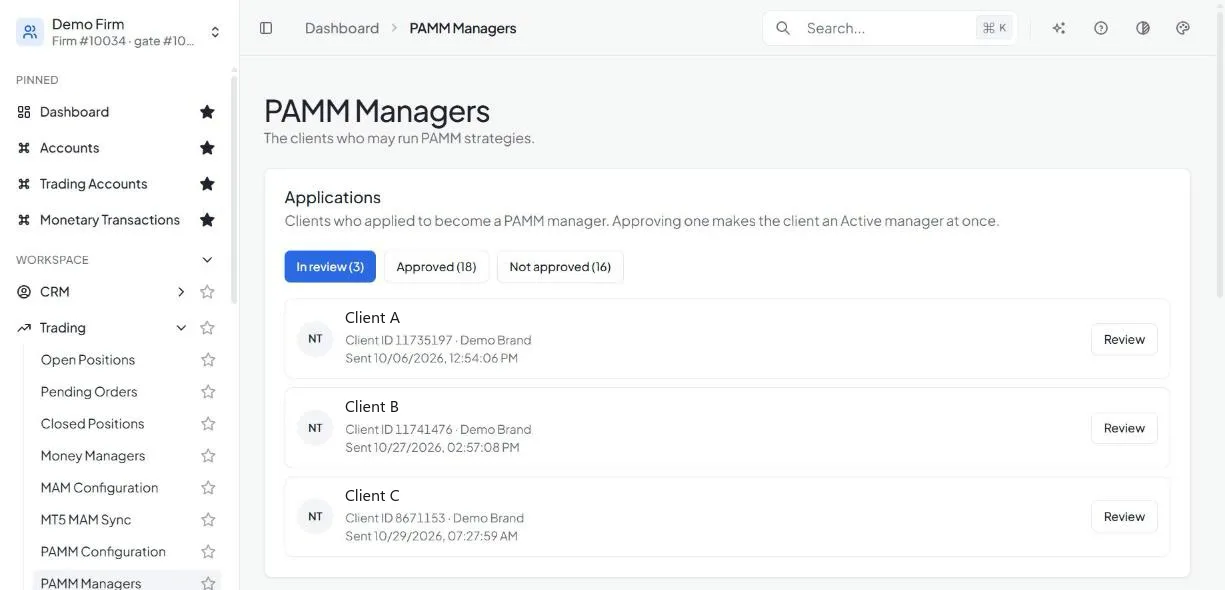
You approve every manager.
PAMM
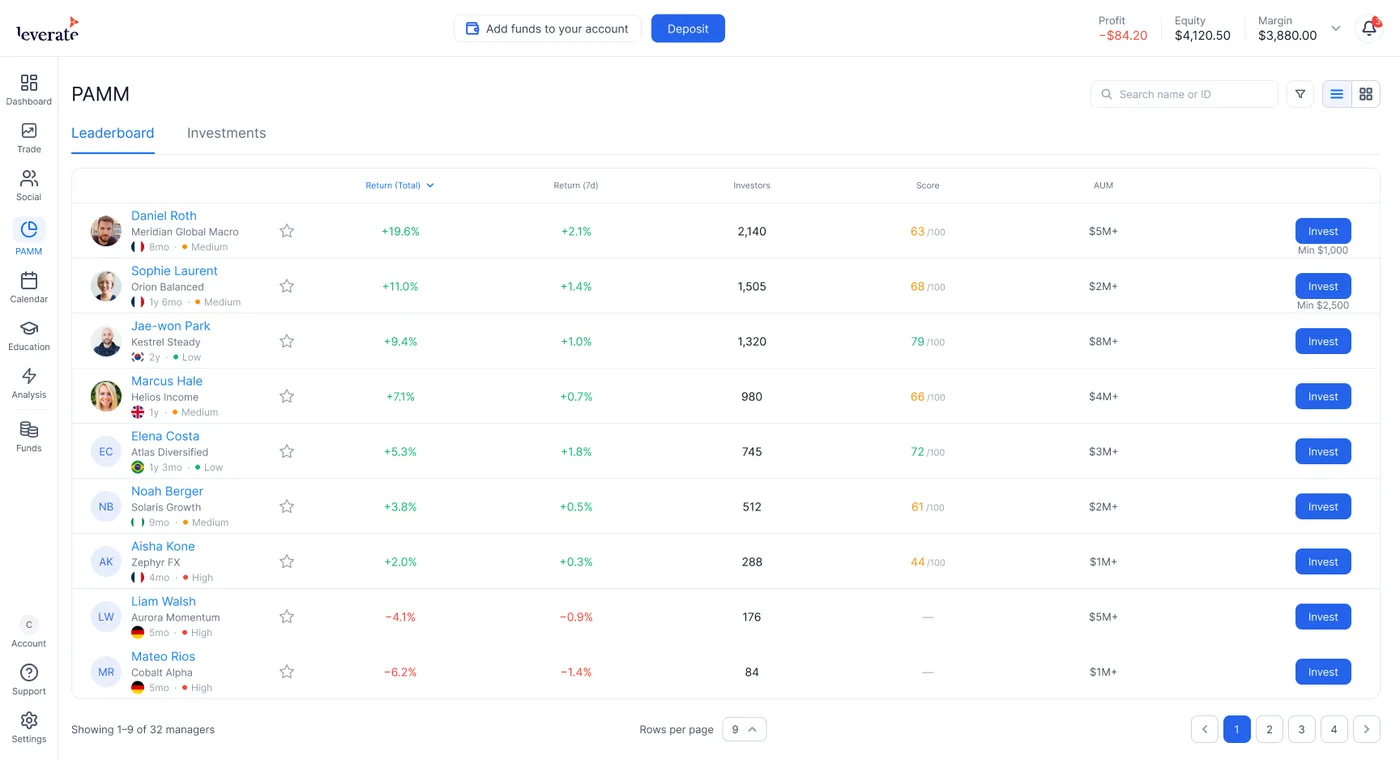
Pooled funds, public leaderboard
- 1Trader
Applies to become a PAMM manager
- 2Broker
Reviews and approves the application in the Back Office
- 3Manager
Creates a strategy and publishes it to the leaderboard
- 4Investor
Finds the strategy on the leaderboard and invests
Prefer to hand-pick? Skip the application and grant the manager role directly.
MAM
Own accounts, invite-only managers
- 1Broker
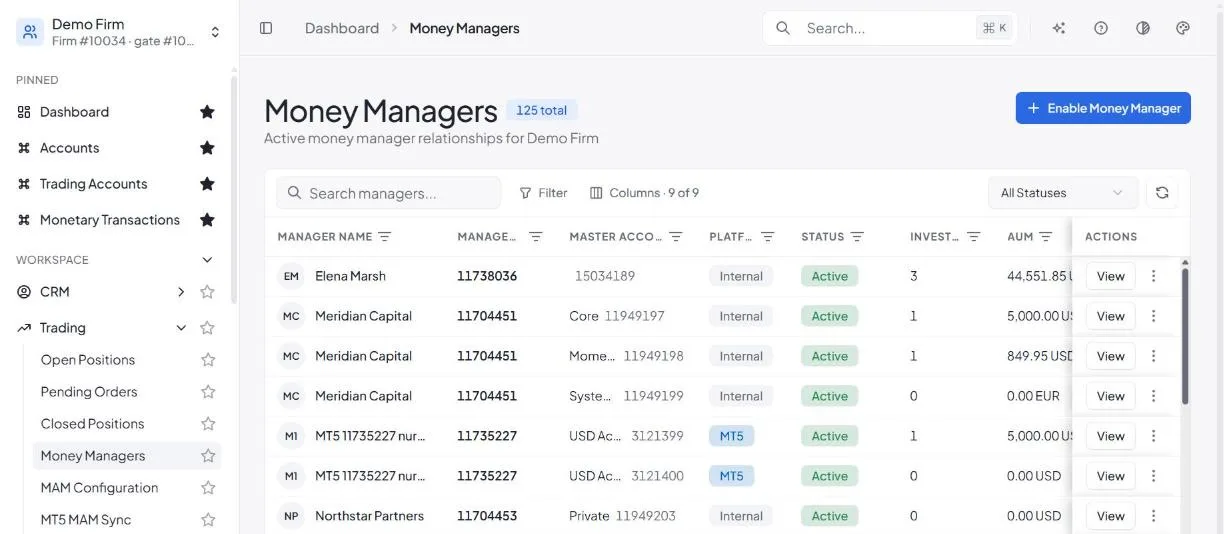
Turns a client’s account into a money manager account
- 2Manager
Invites investors by email or account ID
- 3Investor
Opens a managed account
- 4Investor
Approves the manager’s terms and funds the account
No trader can make themselves a MAM manager. It is always your decision.
For brokers
Why brokers add PAMM and MAM
Every manager fee earns you a share, and every track record stays on your platform.
New recurring revenue
Earn a configurable share of every management and performance fee, paid into your chosen account each cycle.
More deposits
Investors fund managed accounts to follow experienced traders, bringing new money onto your books.
Stronger retention
Managers, investors and performance history stay inside your ecosystem, so clients have a reason to stay.
Full control, no developers
Set approvals, fees and limits per brand in the Back Office. No tickets, no code.
Approve managers and set the rules in one place
Review PAMM applications, enable MAM money managers, and control fees and limits per brand.
For traders and investors
Built for client trust
Clear rules on both sides, so managers want to trade with you and investors feel safe following them.
High-water mark
Performance fees are charged only on new profit.
Investors stay in charge
A MAM manager can trade, but can’t deposit or withdraw. Investors can end the connection any time.
Clear terms up front
Fees and minimum deposit are shown before an investor approves a manager.
Transparent earnings
Managers see every fee they earned, per investor, after the broker share.
Funds stay protected
Money managers can never withdraw investor funds.
Public track records
Return, risk and assets under management are shown on the leaderboard.
More than a plugin
How Leverate PAMM & MAM compares
| Capability | Standard PAMM / MAM | Leverate PAMM & MAM |
|---|---|---|
| Getting started | Switch CRM or migrate platform | Standalone on your stack, or built into Leverate CRM |
| Manager onboarding | Vetting by email and spreadsheets | In-app application, approved in the Back Office |
| Fee rules | Changed through vendor tickets | Allow, forbid, lock and cap each fee yourself |
| Broker revenue | Manual fee reconciliation | Automatic broker share, paid each cycle |
| Investor discovery | Marketed off-platform | Public leaderboard (PAMM) or private invites (MAM) |
| Trade allocation | Manual splits across accounts | One trade split across all investors automatically |
| Investor transparency | Statements on request | Live dashboard and public track record |
| Manager oversight | Support ticket to suspend | Suspend any manager in one click |
| Rollout | One switch for the whole firm | Turn on per brand, when you're ready |
Turn your best traders into a new revenue stream
Add PAMM and MAM to your MT4 or MT5 brokerage without changing your CRM. See it live in a 30-minute demo.
Book a free demo
Loading form…
What is the difference between PAMM and MAM?
In PAMM (Percentage Allocation Management Module), investor funds are pooled and profits are split by each investor’s share of the pool. In MAM (Multi-Account Manager), each investor keeps their own account and the manager’s trades are allocated across those accounts.
Can I add Leverate PAMM and MAM without using Leverate CRM?
Yes. Both are available as standalone products for MT4 and MT5 brokers, so you can add them without changing your CRM or migrating platforms. Brokers on Leverate CRM can switch them on inside their existing ecosystem.
Which trading platforms are supported?
Leverate PAMM and MAM work with MT4, MT5 and the Leverate trading platform.
How does a broker earn from PAMM and MAM?
You set a broker share of every fee a manager charges, such as performance and management fees. Your share is paid into the account you choose each cycle. Managed accounts also bring new investor deposits.
Which fees can managers charge?
Managers can charge performance, management and subscription fees, within the rules you set. In the Back Office you allow, forbid or lock each fee and set the caps.
What is a high-water mark?
A high-water mark means performance fees are only charged on new profit. If an account loses value, the manager must recover the loss before earning a performance fee again.
Who decides which traders become money managers?
You do. PAMM managers apply and you approve or decline each application in the Back Office, or grant the role directly. MAM managers can only be enabled by you.
Can a money manager withdraw investor funds?
No. Managers can trade on investors’ behalf but cannot withdraw their money. MAM investors can end the connection any time.
Do I need developers to configure PAMM and MAM?
No. Approvals, fees, broker share, minimum deposits and connection rules are all set in the Back Office, per brand.
How long does it take to launch?
Brokers on Leverate CRM can switch PAMM and MAM on from the Back Office. For standalone MT4 and MT5 setups, our team handles the integration with you. Book a demo to get a timeline for your setup.