







MCP for Traders: Your Clients Can Now Trade Through Their Own AI
Clients connect their own AI app to a live or demo account in seconds, ask anything, and place trades by chat.
Traders already run their research through an AI assistant. They just have nowhere to point it. Ask about gold and the assistant answers from general knowledge. Ask what that means for the position sitting in the account, and it cannot see the account at all.
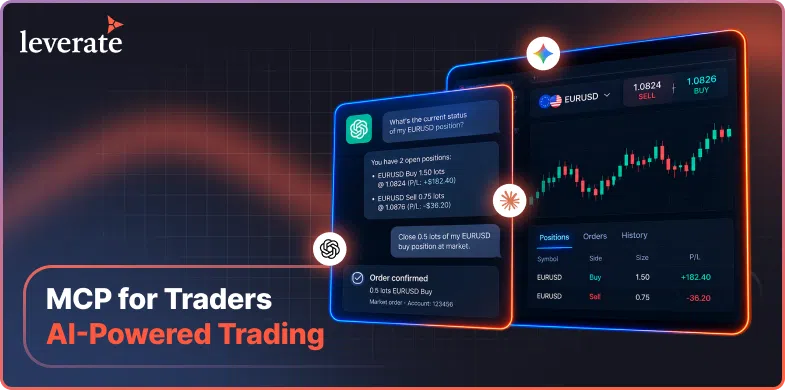
Leverate MCP for Traders closes that gap. It connects a trader’s own AI trading assistant directly to their live account through the Model Context Protocol, so the assistant can read balances and positions, analyse instruments and prepare orders, with the trader confirming each one before anything reaches the market.
An AI trading assistant, in this context, is the assistant the trader already uses, connected to one trading account through an open protocol. It is not a model the broker hosts, and it is not an automated strategy. It reads account and market data, explains what it finds, and prepares actions that the trader approves.
That distinction matters for how a broker positions it. Nobody has to learn a new product. The AI trading assistant a client already uses gains sight of the account they already hold, the broker decides which clients get that connection, and the firm keeps a record of everything done through it.
Why Traders Are Already Using AI Without Their Broker
The behaviour is established. An Investing.com survey of 938 US retail investors, published in April 2026, found that 62% use AI tools to inform their investment decisions, and around half have used chatbots for investing research.
The appetite goes further than research. The Mills Review, published on 6 July 2026, found that a fifth of UK adults, around 11 million people, would be likely to use AI that can act on their behalf within goals they set. That is a mainstream expectation forming around AI that does things rather than just answers questions.
For an operator, the uncomfortable part is where that activity currently happens. A client pastes their positions into a chat window on a different tab. They ask an assistant that has no view of the broker’s spreads, instrument specifications or trading hours, and no idea what the account can actually support. The answers come back confident and sometimes wrong, the broker never sees the exchange, and there is no record of it anywhere in the CRM.
The status quo costs a broker three things. It costs visibility, because the most engaged part of a client’s process happens somewhere the firm cannot observe. It costs relevance, because the assistant becomes the interface the client returns to and the platform becomes the place they go only to click. And it costs insight, because a firm learns nothing about what its most active clients are trying to work out.
The Mills Review makes a second point that matters commercially. It expects consumer journeys to become agent-led, with people increasingly delegating to AI applications that compare options and act on their behalf, and it treats that as a reshaping of competition rather than a technical detail. Applied to trading, a firm whose account an assistant can reach has a different relationship with that client than a firm whose account it cannot.
None of that is solved by asking clients to stop. It is solved by giving the assistant a supervised way into the account.
How an AI Trading Assistant Connects to a Trading Account
The connection runs on the Model Context Protocol, an open standard for linking AI applications to external systems. When Leverate released MCP for Brokers in July 2026, brokers could point an assistant at their CRM, Broker Portal and trading platform data to ask operational questions in plain language. This release extends the same approach to the individual trading account.
The open standard is what makes this simple for everyone. The platform exposes its capability once, and any AI app that supports the standard can connect to it, so a client is never told which assistant to use and a broker never commissions an integration for each one.
Setup takes seconds and happens inside the platform. A trader opens the AI Connector section in their app settings, copies a connection prompt or configuration into their AI app, and the assistant has secure access to that one account. It works on a live or a demo account, which gives cautious clients an obvious way in and gives support an easy answer when someone wants to try it first.
Fifteen tools sit behind the connection. Ten read account and market data. Five place and manage trades. In practice a client can ask what their balance and open positions look like, how an instrument has moved, what a term in their contract specifications means, and then act on the answer without opening another window.
Every action runs in two phases. The assistant prepares the order and restates it in full, covering instrument, direction, size, price, stops and the effect on margin. Nothing executes until the trader approves it inside their own AI app. No approval, no trade.
For the broker, none of this is a development project. The capability is already built into the platform and waiting on a switch.
The scope stays narrow by design. The assistant works on the connected account and the broker’s own instruments, explains instruments and trading terms plainly, and declines requests for advice, recommendations or predictions.

What Does This Look Like for a CFD Broker or a Prop Firm?
For a CFD broker it becomes a retention and engagement feature offered to a chosen client segment. For a prop firm it becomes an evaluation-safe tool, because orders placed through an assistant pass through the same risk engine as manual ones and respect challenge rules and daily-loss limits.
Take a CFD brokerage with a segment of active clients who are already heavy AI users. The firm enables the connector for that group first. A client asks their assistant what their exposure looks like before the London open, gets an answer drawn from live account data rather than a pasted screenshot, and closes a position in the same conversation after confirming the order. The firm sees the order in its CRM, flagged as AI-originated, sitting alongside every manual order.
The value there is not novelty. It is that a conversation the client was already having now runs against real account data, on the firm’s platform, inside the firm’s instrument set. Support can see what was asked for when a client queries an order, and the retention team can look at whether connected clients behave differently from the rest of the segment.
Now take a prop firm running funded accounts. The concern is never engagement, it is rule breaches. An AI-placed order that would break a daily-loss limit is blocked by the risk engine exactly as a manual one would be, and the rejection reason surfaces in the conversation. The firm gains the modern feature without loosening the evaluation.
For the candidate, the appeal is different from a retail client’s. During an evaluation the questions are constant. How much room is left today, what a position is doing to the drawdown, whether an order size fits inside the rules. Those answers now come back in seconds, from live account data, in the same place the candidate is already thinking through the trade.
| CFD brokerage | Prop firm | |
| Primary value | Engagement and retention on the firm’s own platform | A current feature that does not weaken evaluation rules |
| Typical first segment | Active or high-value clients, by group or trading terms | Funded accounts, or a single challenge cohort |
| Risk position | Standard account risk rules apply unchanged | Challenge and daily-loss limits enforced identically |
| What the firm sees | AI-originated orders flagged in Leverate CRM | Same flag, alongside existing evaluation data |
| Trader benefit | Faster answers and actions without leaving the chat | Rule-aware trading help during a live challenge |

Neither scenario asks the broker to build anything. What separates them is who the first cohort is, and what the firm is watching for once the connection is live. The connector runs on the trading platform and the Client Portal, on desktop and on mobile, with light and dark themes and right-to-left language support, so a firm with a client base spread across regions can open it to all of them at once.
What Do Brokers and Traders Get Out of It?
Traders get their account inside the tool they already think in, with answers drawn from live data instead of a pasted screenshot. Brokers get an immediate product story, a reason for active clients to stay on their own platform, and a view of activity that until now happened somewhere else entirely.
For the trader the appeal is speed and plain language. Checking exposure before the London open takes one question rather than three screens. An unfamiliar term in the contract specifications gets explained in the same conversation where it came up. A position gets closed without hunting for the right panel on a phone. None of it requires learning a new interface, because the interface is the one they already use every day.
For the broker the appeal is commercial. This is a feature worth announcing, and one an active client will notice. Targeting means it can go to a chosen segment first, by group, trading terms, country or a manual allowlist, so a firm can open with the clients most likely to use it and widen from there. Every order placed through an assistant is logged to Leverate CRM with its own source flag, so a firm can see how much activity it is generating and from whom.
That visibility is the quietly valuable part. A broker can measure how many of a targeted cohort connect, how many go on to place an order, and whether those clients trade differently from the rest of the segment. Few engagement features arrive with that kind of read on their own impact.
There is also a positioning benefit that is easy to underrate. A broker that supports this is telling its clients it keeps pace with the tools they use elsewhere in their day, and that is a message active traders notice.
The connector is enabled per brand from the Broker Portal, where it is off by default, and targeting is set in the same place. It is live on Leverate’s white label trading platform and the Client Portal, on desktop and mobile, with MT4/5 solutions to follow.
Frequently Asked Questions
What is an AI trading assistant connection?
It is a link between a trader’s own AI application and one trading account, built on the Model Context Protocol. The assistant can read account and market data and prepare orders. The trader confirms every action. The broker enables the feature and decides which clients receive it.
Is MCP for Traders for CFD brokers, prop firms, or both?
Both. CFD brokers typically use it as an engagement and retention feature for an active client segment. Prop firms use it knowing that assistant-placed orders pass through the same risk engine as manual orders, so challenge rules and daily-loss limits are enforced without any change.
What problem does it actually solve for a broker?
Clients are already using AI assistants alongside trading, but outside the platform and outside the broker’s view. This moves that activity onto the firm’s own platform, where it can be targeted, risk-checked and recorded, rather than happening in a browser tab the broker never sees.
How does a trader connect their assistant?
The trader opens the AI Connector section in their app settings and copies a connection prompt or configuration into their AI app. It takes seconds, works on a live or demo account, and binds to that one account. A token the trader controls secures it, and disconnecting ends it immediately.
What can the assistant actually do once connected?
Fifteen tools sit behind the connection. Ten read account and market data, so a client can ask about balance, margin, positions, orders and prices. Five place and manage trades. Every action that touches the market is prepared first and executed only after the trader confirms it.
Does it trade on a client’s behalf?
No. Every action runs in two phases. The assistant prepares the order and restates the instrument, direction, size, price, stops and the effect on margin. Nothing reaches the market until the trader approves it in their own AI app. There is no autonomous or unattended trading.
How does a broker switch it on?
It is enabled per brand in the Broker Portal and is off by default. In the same place, a firm chooses which traders receive it, targeting by group, trading terms, country or a manual allowlist. Eligible traders then see the AI Connector section in their settings.
What does it connect to in the Leverate ecosystem?
It runs on Leverate’s white label trading platform and the Client Portal, on desktop and mobile, with MT4/5 solutions to follow. Orders route through the platform’s existing execution and risk layers, and every AI-originated order is logged to Leverate CRM with a source flag.
What does a trader actually get out of it?
Speed and plain language. Checking exposure takes one question instead of three screens, an unfamiliar term gets explained in the conversation where it came up, and a position can be closed without hunting for the right panel. All of it inside the app they already use daily.
CTA: Talk to the Leverate team about switching on MCP for Traders, and about which client segment to start with.
Disclaimer:
This content is based on multiple sources and is provided for educational purposes only. It does not constitute financial, legal, or investment advice.