An AI CRM for forex brokers should do the search, summary and triage work that eats your staff's day: find the right client, pull together their deposits, trades and tickets, flag who needs attention and draft the next step, while people keep the decisions. This guide sets out the seven jobs worth giving an AI assistant inside the broker CRM, the limits to put around it, and a 30-day plan to test one before you commit.
Most AI talk in this industry is about the trader side: strategy builders, chart plugins and signal bots. The bigger time savings often sit behind the scenes, with the sales, retention, dealing and finance teams who live inside the CRM all day.
Why Brokers Are Adding AI to the CRM Now
The market a brokerage competes in keeps getting bigger and busier. The 2025 Triennial Central Bank Survey from the Bank for International Settlements put global FX turnover at $9.6 trillion a day in April 2025, up from $7.5 trillion in 2022. More activity means more sign-ups, more deposits, more tickets and more partner questions for the same desk to handle.
AI has also moved from experiment to everyday business tool. The 2025 edition of McKinsey's State of AI survey found that 88% of organisations use AI in at least one business function. Your staff use assistants outside work and now expect the same speed inside it.
That is why CRM automation for brokers is shifting. Rules-based workflows still matter, but the new layer is an AI assistant for broker CRM work that staff can simply ask. The question for a broker owner is no longer whether to add AI. It is which tasks to hand over, and how far to let the assistant go.
Scale your brokerage today!
CRM & Client Portal, Trading Platform, MT4 & MT5 - All built for you.
Scale NowStart With One Client Record
An assistant can only answer well if it can see the whole client. In many brokerages, that client is spread across five places. The CRM holds the lead and onboarding status, MT4 or MT5 holds the trading accounts, the payment provider holds deposits, the help desk holds tickets, and the affiliate system holds the referring partner.
If those records are not tied to one client identity, the assistant gives partial answers. Ask why a client stopped trading and it may see the trades but miss the failed withdrawal and the angry ticket that explain it. A partial answer can be worse than none, because it sounds confident.
So before any AI feature goes live, make sure your MT4/MT5 CRM links every trading account, payment and ticket to the same person. If you are still wiring the platform to the CRM, our guide to adding a CRM to your MT4 and MT5 setup covers the integration side. The rest of this article assumes the data is joined.
Seven Jobs an AI CRM for Forex Brokers Should Do
A useful way to scope an assistant is by team. Each team has questions it asks dozens of times a day, and each answer currently takes several clicks across several screens. The table below maps the seven jobs we think an AI CRM for forex brokers should handle first, with the data each job needs and who stays in charge of the outcome.
| Job | Team | Example question staff ask | Data needed | Who approves |
|---|---|---|---|---|
| Lead prioritisation | Sales | Which sign-ups from this week finished onboarding but have not deposited? | Registration, onboarding status, deposit attempts | Sales agent sets call order |
| Pre-call client summary | Retention | Brief me on this client: deposits, open tickets and trading in the last 30 days. | Payments, tickets, MT4/MT5 history | Agent reviews before calling |
| Churn signal alerts | Retention | Which active traders cut their volume by half this month? | Trading volume, logins, withdrawals | Retention manager |
| Exposure questions | Dealing | Which clients hold the largest open gold positions right now? | Open positions, account groups | Head of dealing |
| Payment queue triage | Back office and finance | Which withdrawals have been pending over 48 hours, and why? | Payment records, status reasons | Finance team releases funds |
| Partner performance | IB and affiliate | Which IBs referred clients who deposited but never traded? | Partner tags, deposits, trades | Partner manager |
| Management reporting | Management | Compare net deposits by brand and country, this month versus last. | All joined records | Read-only, no approval needed |
Sales and Retention
Sales desk productivity rises when agents stop building their own call lists. AI lead prioritisation ranks new sign-ups by what they have actually done, such as finishing onboarding, opening a demo or starting a deposit, so the first call goes to the warmest lead. Before the call, a one-paragraph brief replaces minutes of clicking through tabs.
Retention automation works the same way. A sudden change in behaviour is often the earliest sign a client is drifting: someone who traded daily goes quiet, or withdraws most of their balance in one go. The assistant should surface these clients each morning with the reason attached, so the agent knows why they are calling before they dial.
Dealing and Back Office
Dealers need fast answers about exposure and flow, not reports that run overnight. Plain-language questions about open positions by symbol, group or client let a head of dealing check a hunch in seconds. In the back office, the assistant can sort the withdrawal queue, explain why a payment is on hold and point staff to the records that need a decision.
Partners and Management
IB and affiliate managers spend hours on one question: which partners send clients who actually trade? An assistant that joins partner tags with deposit and trading data answers it on demand. Managers get the same benefit at a higher level, comparing brands, countries or campaigns without waiting for an analyst to build a spreadsheet.
These jobs are only as good as the systems underneath them. Leverate's back office and Forex CRM keeps clients, payments and reporting in one place, and its affiliate and IB management tools keep partner data in the same system the assistant reads from.
Read, Suggest, Act: Setting the Assistant's Limits
The real buying decision is not which features an assistant has. It is how much it is allowed to do. Some tasks are safe to hand over fully. Others should always end with a person clicking approve.
Evidence from other service desks supports keeping people in the loop. In a study of more than 5,000 customer support agents published as an NBER working paper, an AI assistant raised issues resolved per hour by 14% on average and by 34% for novice and low-skilled workers. The gains came from helping people work faster, not from taking them out of the process.
We suggest thinking of autonomy as a ladder. The assistant starts by reading data and only climbs higher once a team trusts its output. Each rung adds risk, so each rung needs a clearer owner.
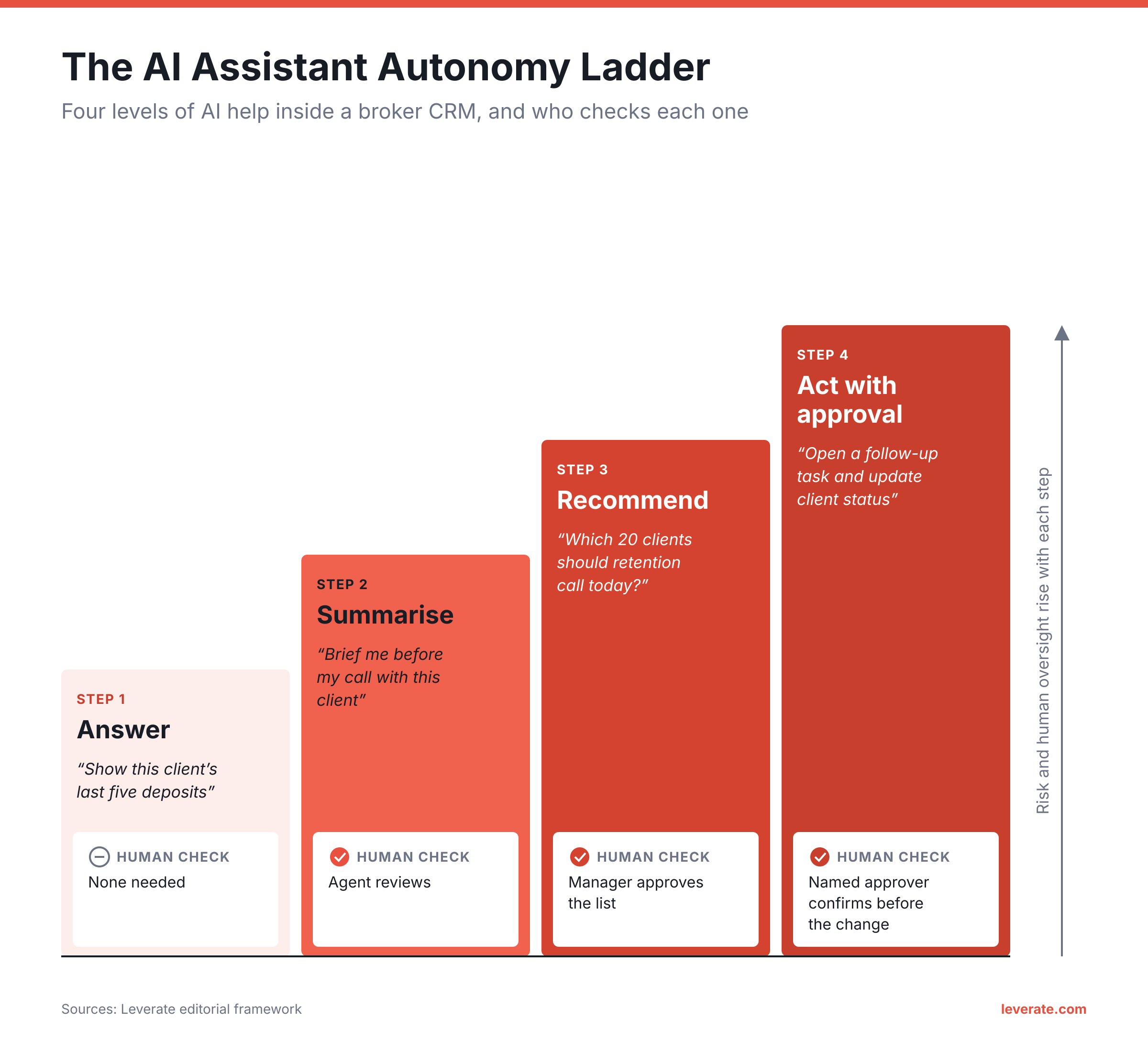
The risk rises sharply once an assistant can write. A wrong answer wastes a minute. A wrong change to a client's account group can affect their pricing and margin until someone notices. Three rules keep any AI CRM for forex brokers safe as it climbs:
- Anything that moves money, changes leverage or edits a client record needs a named human approver.
- Every AI suggestion and action is logged with the question asked, the data used and who approved it.
- Write access is granted per team and per task, never switched on for the whole CRM at once.
How to Pilot an AI CRM in 30 Days
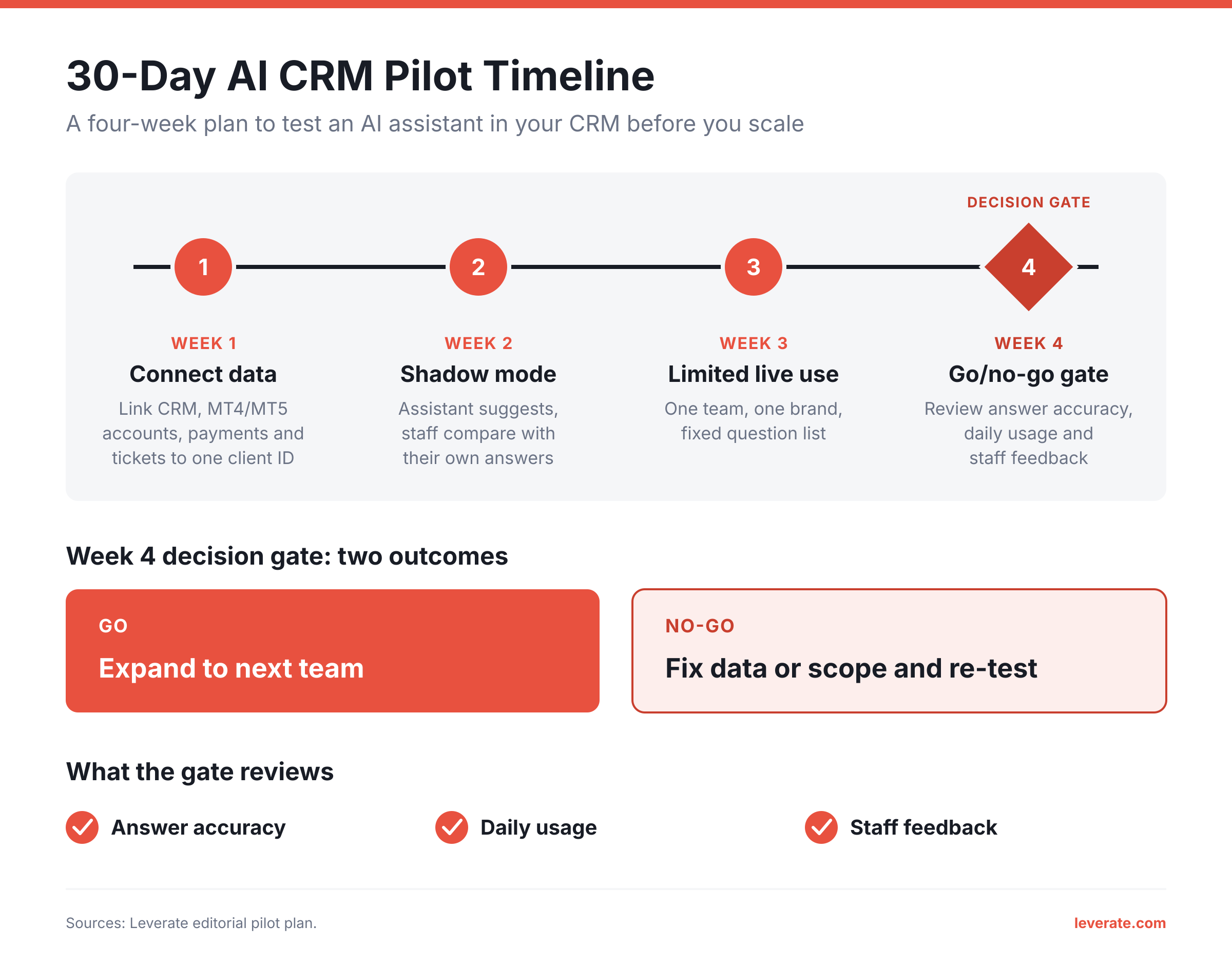
A pilot should prove two things: that the answers are right, and that people actually use them. Keep the scope tight and the timeline fixed. The plan below shows how the four weeks fit together.
Before the pilot starts, get written answers from the vendor to the questions below. They decide whether an AI CRM for forex brokers fits your setup, and vague answers are a warning sign.
- Connected systems: Which platforms, payment providers and help desks does the assistant read from on day one, and which need custom work?
- Data scope: Exactly which objects can it query: clients, trading accounts, positions, payments, tickets, partners?
- Freshness: How often does each source sync? Open positions and payment status need near real-time data, while monthly reporting can run on a daily refresh.
- Write access: Can its output change a client record, open a ticket or trigger a workflow, and can you switch each of those off separately?
- Audit trail: Where are questions, answers and actions logged, and can your team export them?
- Verifiability: Can staff open the records behind each answer in one click to check it?
- Exit: If you stop using the assistant, does the CRM still work exactly as before?
Choose the pilot team with care. A retention desk with a clear daily routine shows results faster than a team whose work changes from week to week, and its agents will tell you quickly whether the answers help.
Build the test from real work, not vendor demos. Collect 20 to 30 questions the team actually asked last month, whether typed into search boxes, shouted across the desk or sent to an analyst. Score each answer as right, partly right or wrong, and note how long the agent would have taken to find it by hand.
How Leverate's CRM Approaches the AI Assistant
Leverate's CRM is built for brokers running MT4 and MT5, and it now includes an AI assistant that staff can question in plain language about clients and accounts. It sits alongside the tools brokers already rely on: IB and affiliate management, payment provider connections and the ability to run several brands from one place.
For brokers who want to bring their own AI tools, the Leverate MCP server connects AI assistants to broker data. Orders placed through AI assistants are flagged in the CRM, so risk teams can separate them from manual trades. That is the kind of control the limits above call for.
This is where an AI CRM for forex brokers earns its keep: the assistant, the client record and the trading platform share one data model, so answers come from the same source staff already use every day.
The Bottom Line
An AI assistant belongs in the CRM when it answers the questions each team asks every day, from records staff already trust. Join the client record first, then let the assistant climb from reading to acting one team at a time. The right AI CRM for forex brokers makes every desk faster without blurring who is accountable. To see how Leverate's CRM and MCP server fit your brokerage, talk to our team.
Disclaimer: This content is based on multiple sources and is provided for educational purposes only. It does not constitute financial, legal, or investment advice.